> ## Documentation Index
> Fetch the complete documentation index at: https://zenskar.com/docs/llms.txt
> Use this file to discover all available pages before exploring further.
# Create your own Flow
> You can use Package Components to create Flows tailored to your Workflows and Setup. The following includes examples, Apex Actions, and Apex Classes that can be utilized to design these Flows.
## Some example Flows
These are a few example flows that you can refer to while creating your own custom flows.
### Syncing Customers to Zenskar
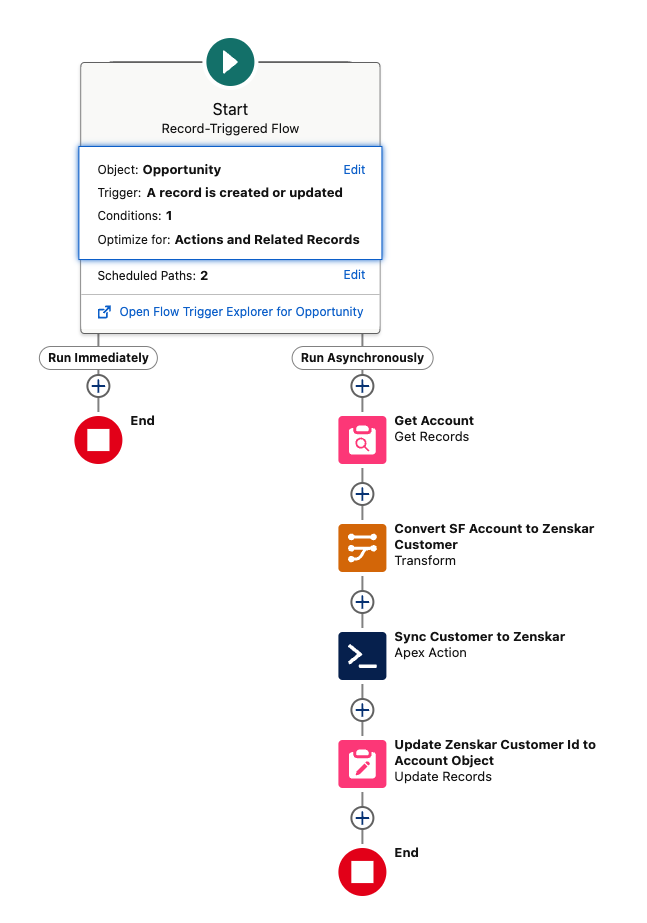
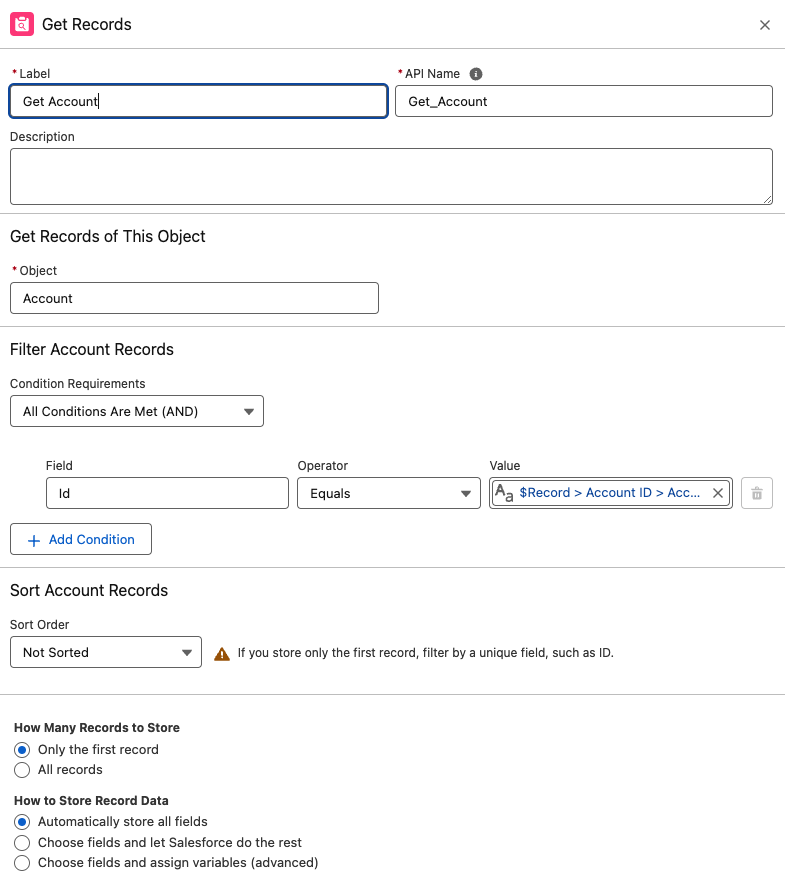
1. Get records from the **Account** object.
2. Map account details to the `ZenskarCustomer` object.
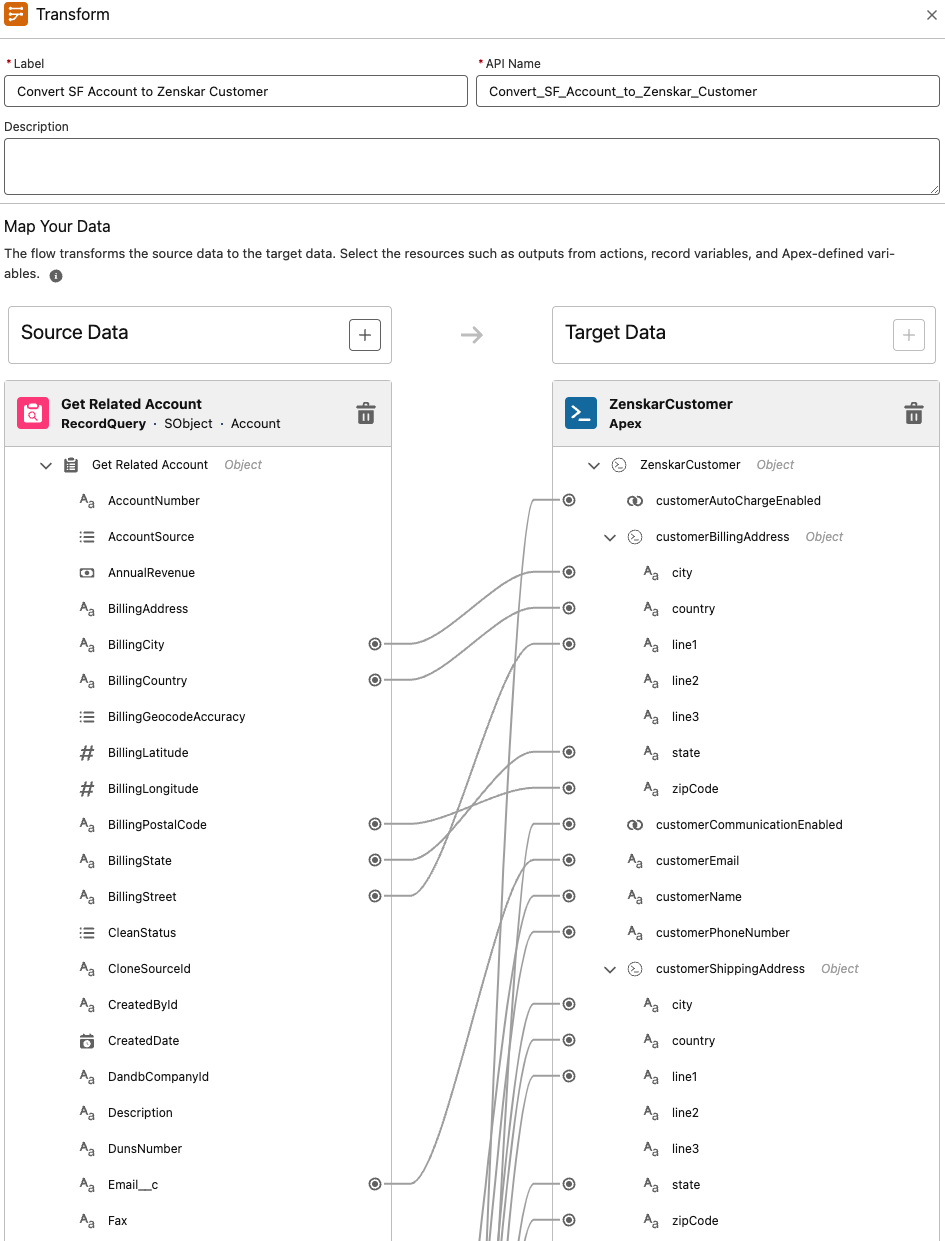
Note: There are custom fields available in package, you show them on layout and use that in flows. Check Layout Section in Account Object in SF after package install
3. Add fields of Transformed Data to Zenskar Sync Customer Apex Action.
4. Update Zenskar Customer ID to Related Object so Updates can be synced.
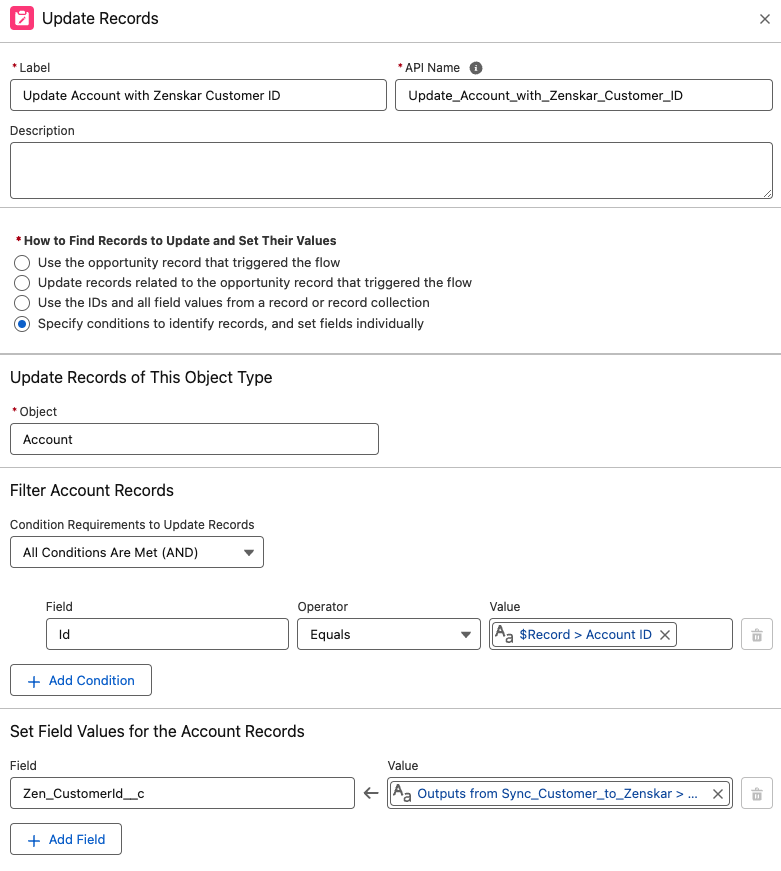
Note: You can use provided custom field for storing Zenskar Customer ID
### Syncing Contracts
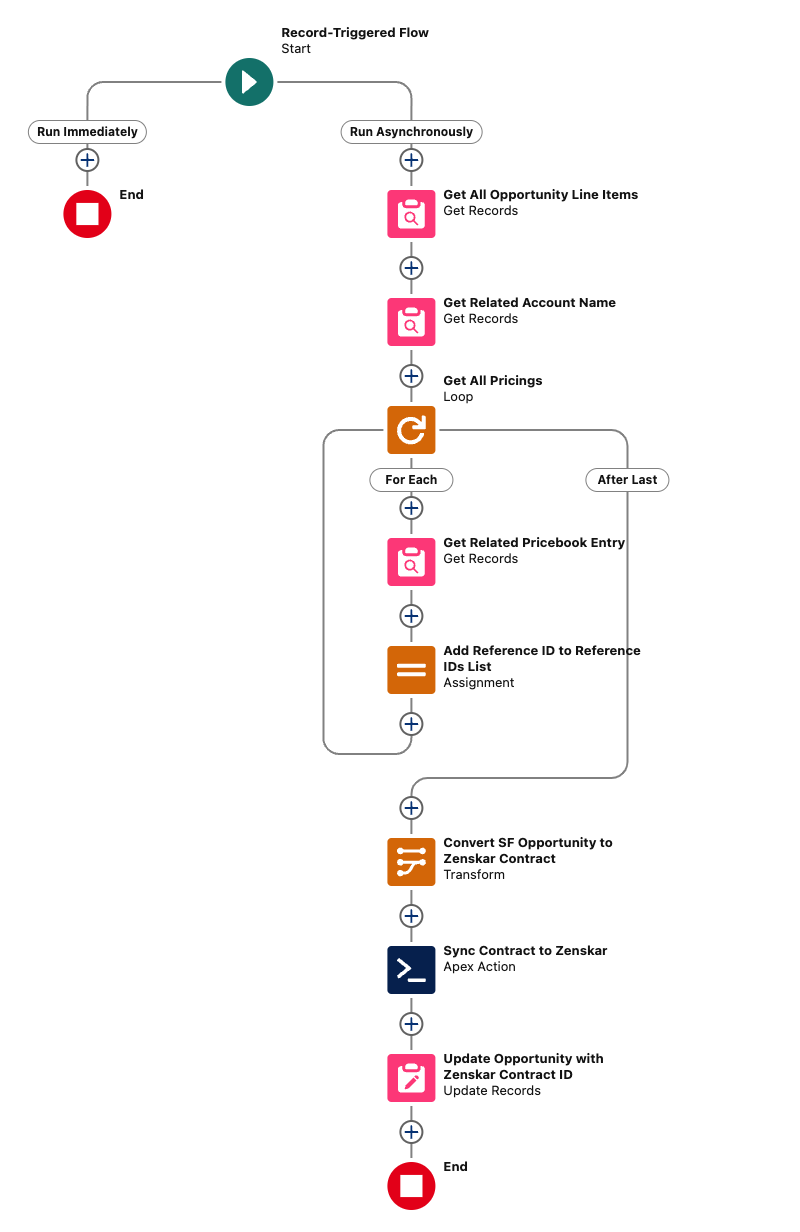
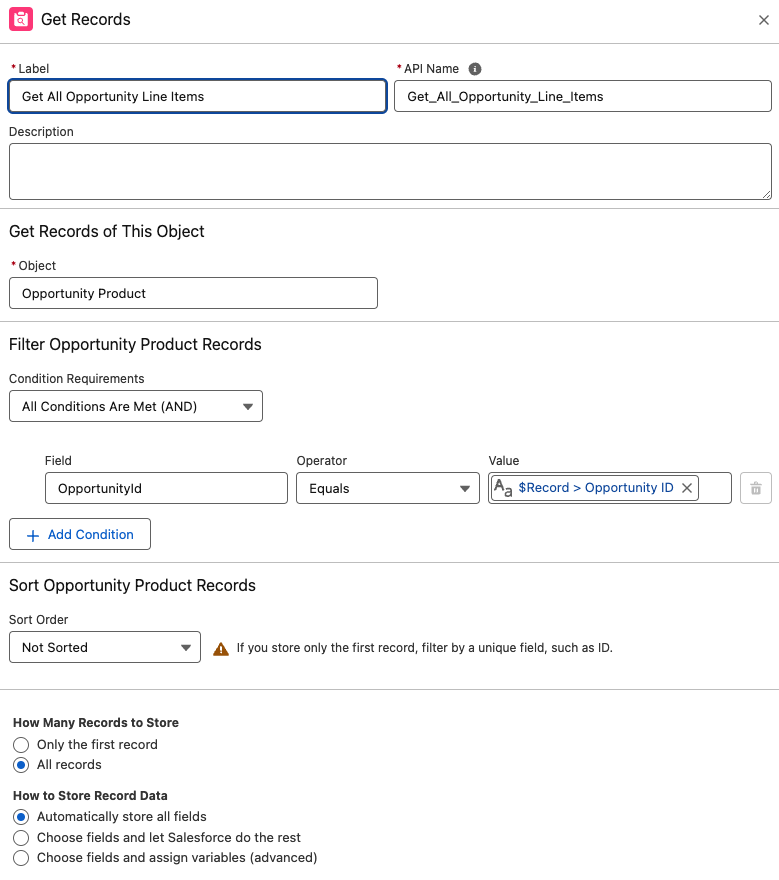
1. Retrieve all Opportunity Line Items for the triggering Opportunity.
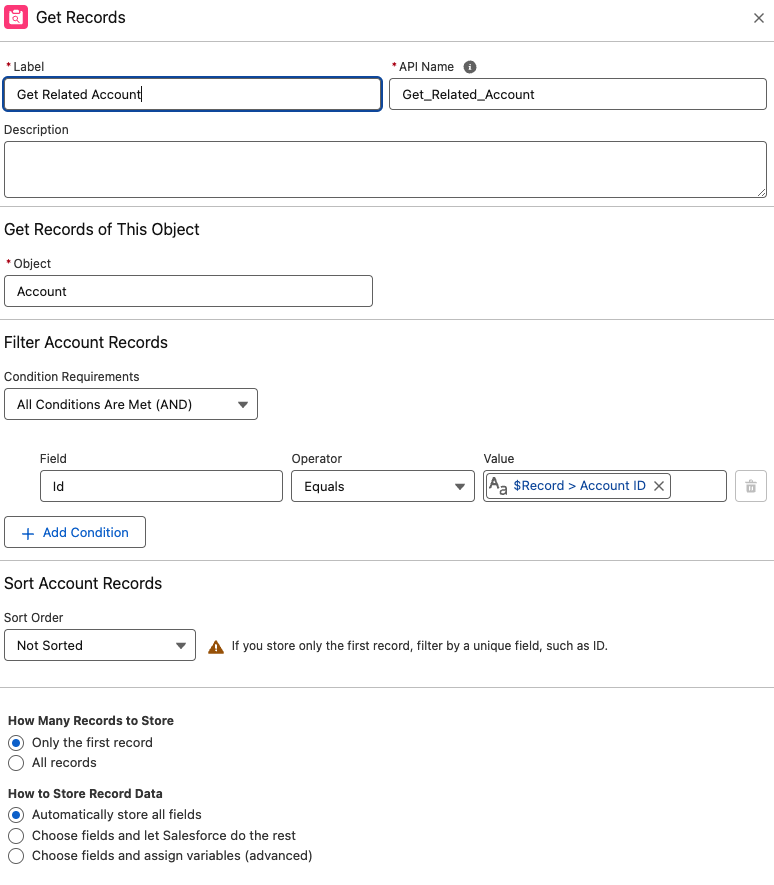
2. Get Related Account for Triggering Opportunity.
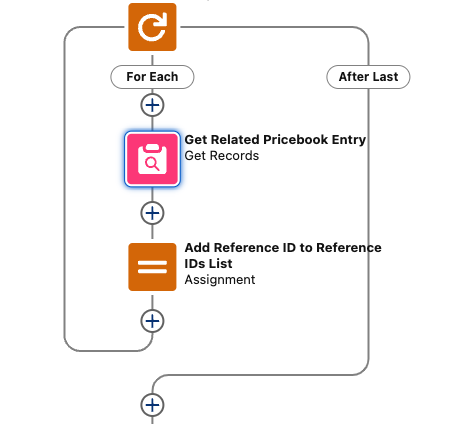
3. Loop over Opportunity Line Item and Get PriceBookEntry for each Opportunity Line Item. Add Pricebookentry’s Link ID(Zenskar) to a Collection of String (ReferenceIDs List).
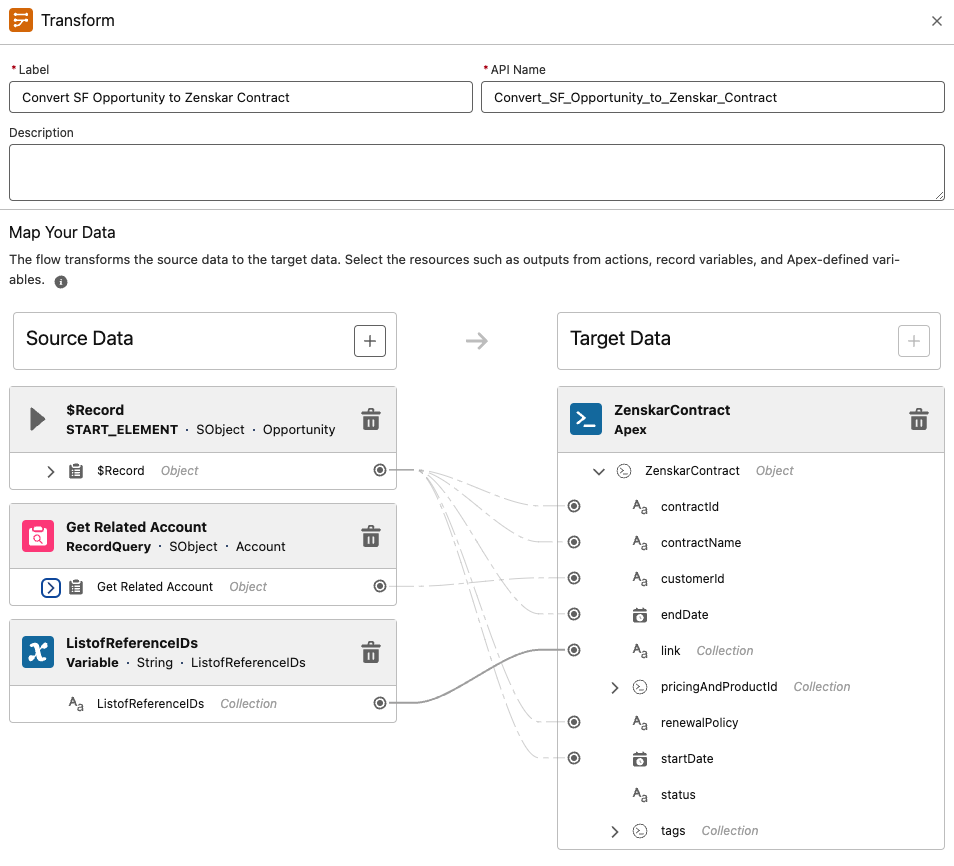
4. Convert the Salesforce Opportunity to a `ZenskarContract` object.
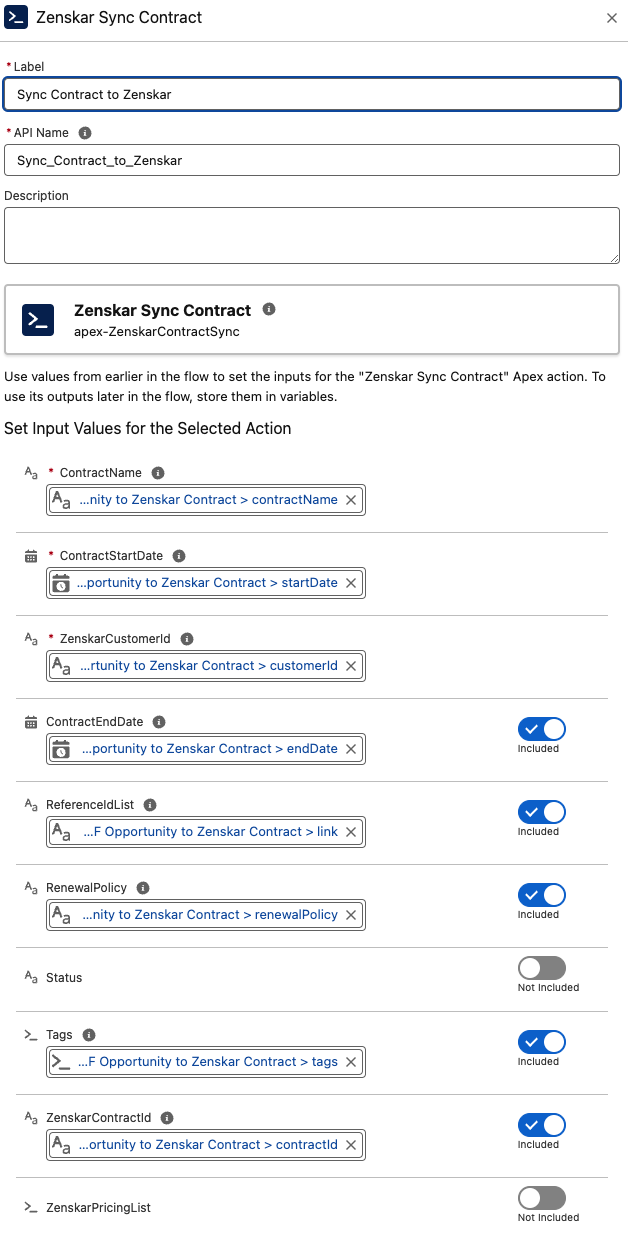
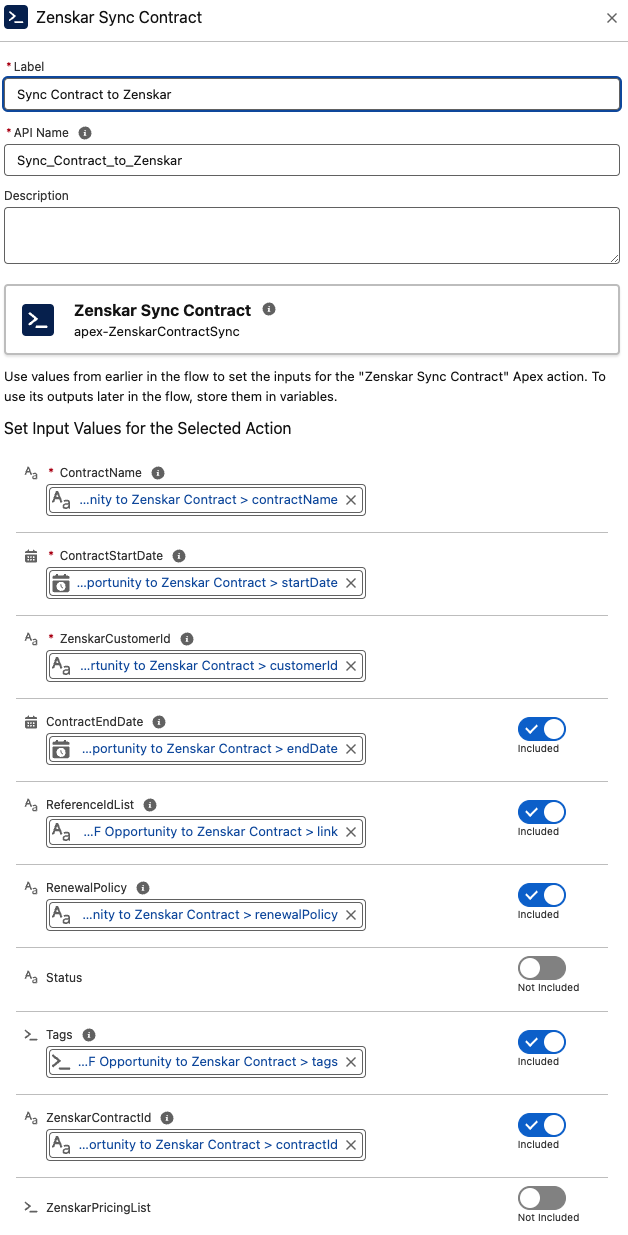
5. Add Zenskar Sync Contract Apex Action and Use Data from Transformer(Convert SF to Zenskar Contract).
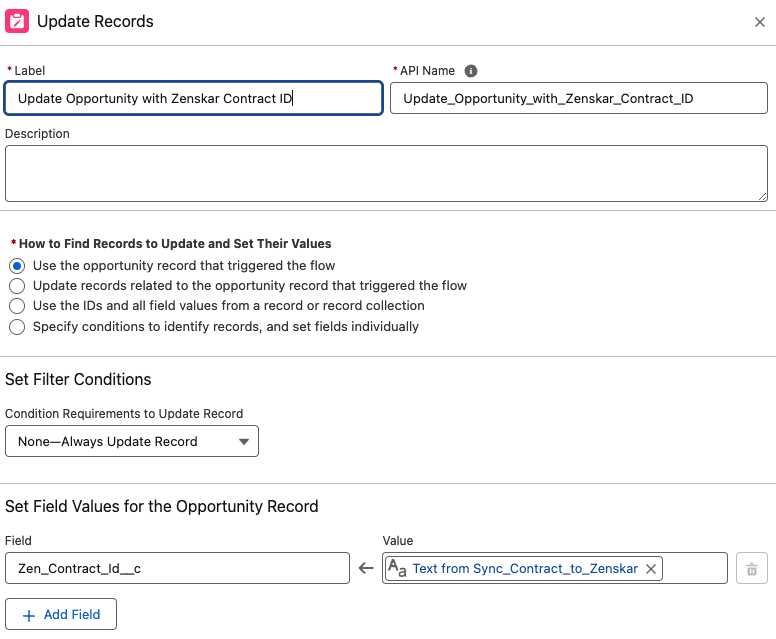
6. Update the Opportunity with the `ZenskarContractId`.
7. **Sync with Zenskar**
* Close the Opportunity as ‘Won’ to automatically create and sync data to Zenskar.
For managing Pricebooks and Products, see [Manage Price Books](https://help.salesforce.com/s/articleView?id=sf.products_pricebooks_overview.htm).
## Package components
### Apex Actions
These actions are provided in our Salesforce package to sync data from Salesforce to Zenskar.
#### Zenskar Customer sync
Creates or updates a customer on Zenskar. This action is required to create a contract.
**Inputs**
| Field | Description |
| ------------------------ | ------------------------------------------ |
| `CustomerExternalID` | ID of the customer in your system |
| `CustomerName` | Name of the customer (required) |
| `CustomerEmail` | Email of the customer |
| `BillingAddress` | Customer's billing address |
| `ShippingAddress` | Customer's shipping address |
| `CustomerPhoneNumber` | Customer's phone number |
| `IsAutoChargeEnabled` | Enable auto-charge on Zenskar |
| `IsCommunicationEnabled` | Enable communication on Zenskar |
| `Tags` | Customer tags |
| `ZenskarCustomerId` | Existing Zenskar Customer ID (for updates) |
**Output**
| Field | Description |
| ------------------- | ----------------------------- |
| `ZenskarCustomerId` | ID of the customer on Zenskar |
***
#### Zenskar Contract Sync
Creates or updates a contract on Zenskar.
**Inputs**
| Field | Description |
| ------------------- | ------------------------------------ |
| `ContractName` | Contract name (required) |
| `CustomerId` | Customer ID (required) |
| `ContractId` | Can be null for a new contract |
| `ContractStartDate` | Start date (required) |
| `ContractEndDate` | Can be null for a perpetual contract |
| `Tags` | Optional Zenskar tags |
| `RenewalPolicy` | Defaults to "Do not Renew" |
| `pricingList` | List of pricing IDs |
| `ReferenceIdList` | Alternative to `pricingList` |
| `Status` | Defaults to "Active" |
**Output**
| Field | Description |
| ------------------- | ----------------------------- |
| `ZenskarContractId` | ID of the contract on Zenskar |
***
#### Zenskar Get Contract
Fetches a contract from Zenskar.
**Input**
| Field | Description |
| ------------ | ------------------------- |
| `ContractID` | Valid Zenskar Contract ID |
**Output**
| Field | Description |
| ----------------- | ----------------------- |
| `ZenskarContract` | Zenskar contract object |
***
#### Zenskar Get Customer
Fetches a customer from Zenskar.
**Input**
| Field | Description |
| ------------ | ------------------------- |
| `CustomerID` | Valid Zenskar Customer ID |
**Output**
| Field | Description |
| ----------------- | ----------------------- |
| `ZenskarCustomer` | Zenskar customer object |
***
### Zenskar Create Product
Creates or updates a product on Zenskar.
**Inputs**
| Field | Description |
| ------------------ | ---------------------------- |
| `ZenskarProductId` | Product ID for updates |
| `Name` | Product name |
| `SKU` | Product SKU |
| `Description` | Product description |
| `IsActive` | Set product status to active |
**Output**
| Field | Description |
| ------------------ | --------------------------------- |
| `ZenskarProductId` | ID of the created/updated product |
***
#### Zenskar Get Pricing
Fetches pricing from Zenskar.
**Input**
| Field | Description |
| ------------- | -------------------- |
| `ReferenceID` | Pricing reference ID |
| `PricingId` | Pricing ID |
| `ProductId` | Product ID |
**Output**
| Field | Description |
| ---------------- | --------------------------------------------- |
| `ZenskarPricing` | Zenskar pricing object |
| `ProductID` | ID of the associated product |
| `Price` | Price amount for per-unit or flat fee pricing |
***
#### Zenskar Create Pricing
Creates per-unit pricing on Zenskar.
**Inputs**
| Field | Description |
| ----------------------- | -------------------------------- |
| `PricingObject` | Contains pricing details |
| `PerUnitPricingDetails` | Contains per-unit amount details |
| `ZenskarProductId` | Product ID for the pricing |
**Output**
| Field | Description |
| ------------- | ----------------------------------------- |
| Same as input | Enriched data with additional information |
***
## Apex classes
You can use Apex classes to store data.
### ZenskarAddress
```java theme={null}
public class ZenskarAddress {
public String line1;
public String line2;
public String line3;
public String city;
public String state;
public String zipcode;
public String country;
}
```
### ZenskarBillingPeriod
```java theme={null}
public class ZenskarBillingPeriod {
public String every; // 1, 2, 3, etc.
public String cadence; // Day, Week, Month, Year
public String offset; // prepaid/postpaid
}
```
### ZenskarContract
```java theme={null}
public class ZenskarContract {
public String contractName;
public String customerId;
public DateTime startDate;
public DateTime endDate;
public List link;
public List pricingandProductId;
public List tags;
public String status; // draft, active, expired
public String renewalPolicy;
}
```
### ZenskarCustomer
```java theme={null}
public class ZenskarCustomer {
public String externalID;
public String customerName;
public String customerEmail;
public ZenskarAddress customerBillingAddress;
public ZenskarAddress customerShippingAddress;
public String customerPhoneNumber;
public Boolean customerAutoChargeEnabled;
public Boolean customerCommunicationEnabled;
public List tags;
}
```
### ZenskarDiscountFeature
```java theme={null}
public class ZenskarDiscountFeature {
public String unit; // percentage of discount
}
```
### ZenskarPerUnitPricing
```java theme={null}
public class ZenskarPerUnitPricing {
public Decimal unitAmount;
}
```
### ZenskarPricing
```java theme={null}
public class ZenskarPricing {
public String zenskarPricingId;
public String Name;
public String Description;
public Boolean isRecurring;
public String linkID;
public ZenskarBillingPeriod billingPeriod;
public ZenskarQuantity quantity;
public String pricingType; // per_unit, flat_fee
public List discounts;
public String oppLineItemId;
}
```
### ZenskarPricingAndProductId
```java theme={null}
public class ZenskarPricingAndProductId {
public String productID;
public String pricingID;
public String oppLineItemId;
}
```
### ZenskarProduct
```java theme={null}
public class ZenskarProduct {
public String zenskarProductId;
public String name;
public String sku;
public String description;
}
```
### ZenskarQuantity
```java theme={null}
public class ZenskarQuantity {
public Decimal quantity;
public String unit;
}
```
### ZenskarTags
```java theme={null}
public class ZenskarTags {
public String label;
public String value;
}
```
***
## Custom Fields Summary
### Account
* `AutoCharge` Invoice (Zenskar)
* `CustomerID` (Zenskar)
* External ID (Zenskar)
### Opportunity
* Contract End Date (Zenskar)
* Contract Renew Policy (Zenskar)
### Product
* `ProductID` (Zenskar)
### PriceBookEntry
* `LinkID` (Zenskar)
For details on creating custom fields, refer to [Salesforce Custom Fields](https://help.salesforce.com/s/articleView?id=sf.fields_defining.htm).
***